6. Setting up your first pod
This guide is how we can create our first pod. I will be pulling latest postgres image (required for my project) but you can use any image you like.
Prerequisites:
- You must have docker installed and running on your system. If you don't know how to do that yet, then you are at the wrong place 🙂.
- Kind (kubenetes in docker): Installation guide: Kind is a tool that will help us to run a local kubernetes cluster. It uses Docker containers as cluster nodes.
- Kubectl.
Steps:
1. Pull postgres image
docker pull postgres:16
docker images // to verify whether you have the postgres image
2. Create a new cluster with kind
kind create cluster --name my-cluster
kubectl cluster-info
kubectl get nodes
3. Load image into Kind
Since Kind uses its own docker nodes, we need to load the image into Kind.
kind load docker-image postgres:16 --name my-cluster

// verify that the image exists
docker exec -it my-cluster-control-plane crictl images // basically you are going inside the the control plane and checking whether images got loaded
Note:
- Once we go inside the my-cluster-control-plane node we can not longer use docker commands.
- Because docker is not the container runtime inside kubernetes node.
- Container is the container runtime in kubernetes node.
- crictl is the tool designed specifically for inspecting and debugging kubernetes
4. Create first Pod
- We need to create a pod.yml file in this step.
apiVersion: v1
kind: Pod
metadata:
  name: postgres-service
spec:
  containers:
    - name: postgres
      image: postgres:16
      imagePullPolicy: IfNotPresent
      ports:
        - containerPort: 5432
      env:
        - name: POSTGRES_DB
          value: "payments"
        - name: POSTGRES_USER
          value: "postgres"
        - name: POSTGRES_HOST_AUTH_METHOD
          value: "trust"
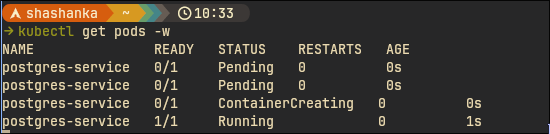
- Now in a separate terminal window run the command
kubectl get pods -w. This will help us to watch the pod life cycle when we create a pod in the next step. - Next apply the above pod.yml using kubectl
kubectl apply -f kubernetes/pod.yml
- We should see something like:
5. Important States:
These are various states the pod
| Status | Meaning |
|---|---|
| Pending | Waiting for scheduling |
| ContainerCreating | Pulling image / starting |
| Running | Healthy |
| Completed | Finished successfully |
| Error | Failed |
| CrashLoopBackOff | Repeated crashes |
6. Describe Pod
kubectl describe pod postgres-service postgres-service
This will give a lot of useful information regarding the pod:
- Metadata: name, namespace, priority, labels etc.
- Container information
- Conditions
- Events

7. View Logs:
To view logs run the below command:
kubectl logs postgres-service
In our case this show postgres startup logs.
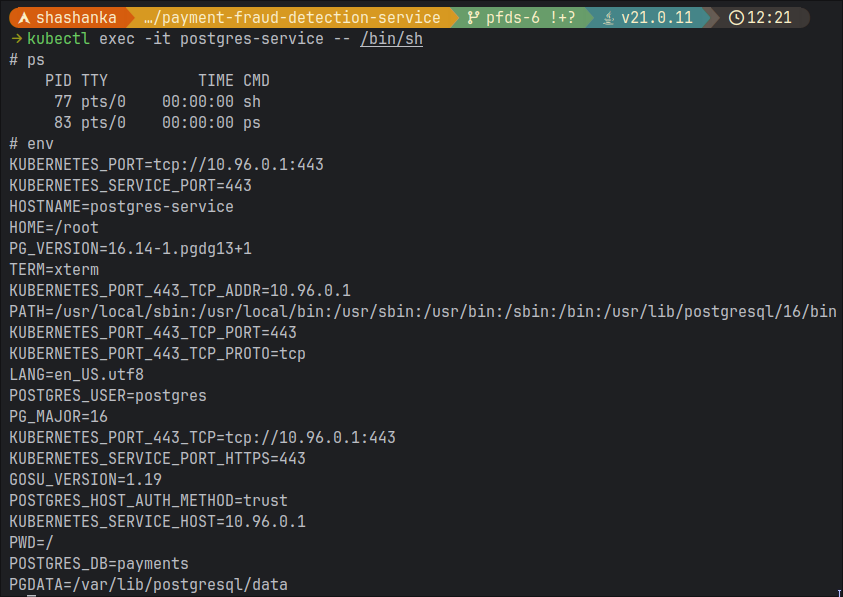
8. Execute commands inside Pod:
Open your terminal and run:
kubectl exec -it postgres-service -- /bin/sh
or
kubectl exec -it fraud-service -- /bin/bash
(depending on image)
Then once inside run ps, env
 There is another way to enter the pod without kubectl:
- Go inside your control plane:
docker exec -it payment-cluster-control-plane /bin/sh
- here run
crictl psto see the list of running containers, grab the container ID. - Then run:
crictl exec -it 4f2b2ceef8ff9 /bin/sh
- Now we are inside the pod and can run the same commands from here as well.
9. Port Forward
The pod won't be externally accessible by default. Let's say if I want to connect to postgres from a GUI for example, I won't be able to do that. To resolve this we need to forward the port.
kubectl port-forward pod/postgres-service 5432:5432
10. Understanding the yaml structure
apiVersion: v1
kind: Pod  ---> defines what object k8s should create. eg. Pod,Service,Deployment,ConfigMap,Secret
metadata:
  name: postgres-service  ---> this is the identity of the object or pod
spec: ---> desired state of the pod. This tells K8s what you want as desired state of application.
  containers: ---> a pod can contain multiple containers
    - name: postgres ---> container identity inside the pod
      image: postgres:16
      imagePullPolicy: IfNotPresent ---> Contols image pulling behaviour. If it is set to Always then image will be pulled on every run. It is mostly set to IfNoPresent. Pulls only when not available locally
      ports:
        - containerPort: 5432
      env:
        - name: POSTGRES_DB
          value: "payments"
        - name: POSTGRES_USER
          value: "postgres"
        - name: POSTGRES_HOST_AUTH_METHOD
          value: "trust"
11. Adding tags to pod.yml file
- Delete the pod, now we will add labels to the pod.
kubectl delete pod postgres-service
- Now add labels to pod.yml
apiVersion: v1
kind: Pod
metadata:
  name: postgres-service
  labels:
    app: postgres-service
    environment: local
...
- Apply the pod.yml file
kubectl apply -f kubernetes/pod.yml
- Check the labels
kubectl get pods --show-labels
- You should see:

- Using labels we can apply filters, like:
kubectl get pods -l app=postgres-service
- Labels will be used when we learn about deployment and services later
12. Applying resource limits
- We can apply limits to our container similar to docker:
spec:
  containers:
    - name: postgres
      image: postgres:16
      imagePullPolicy: IfNotPresent
      resources:
        requests:
          memory: "256Mi"
          cpu: "250m"
        limits:
          memory: "512Mi"
          cpu: "500m"
...
- Use the describe command to observe changes
13. Pod restart behavior
- By default for pods
restartPolicy: Always. This means if a container dies, k8s will restart it. - run
kubectl get pod postgres-service -o yamland check the flag. - If we try to kill the pod, it comes back up automatically.
![[screen-2026-05-31_23-02-58.png]](/assets/images/screen-2026-05-31_23-02-58-bf3b0fb3fbdd2826c738b40ccf23a9fe.png)
14. Let's try breaking things
- Wrong Image: Set
image: postgres:invalidin pod.yml - Now if you apply this configuration, and describe the pod we will see that the image pull failed.
![[screen-2026-05-31_23-18-37.png]](/assets/images/screen-2026-05-31_23-18-37-c23ebdfd61469f5ef1f33b055d7cd497.png)
- Reduce memory: If we reduce memory of the pod by setting
memory: "100Mi", we will see Error: OOMKilled - Crash Application: If we give some invalid settings and the application crashes then we will get Error: CrashLoopBackOff