2. Kubernetes cluster architecture
This document outlines the various components you need to have for a complete and working Kubernetes cluster.
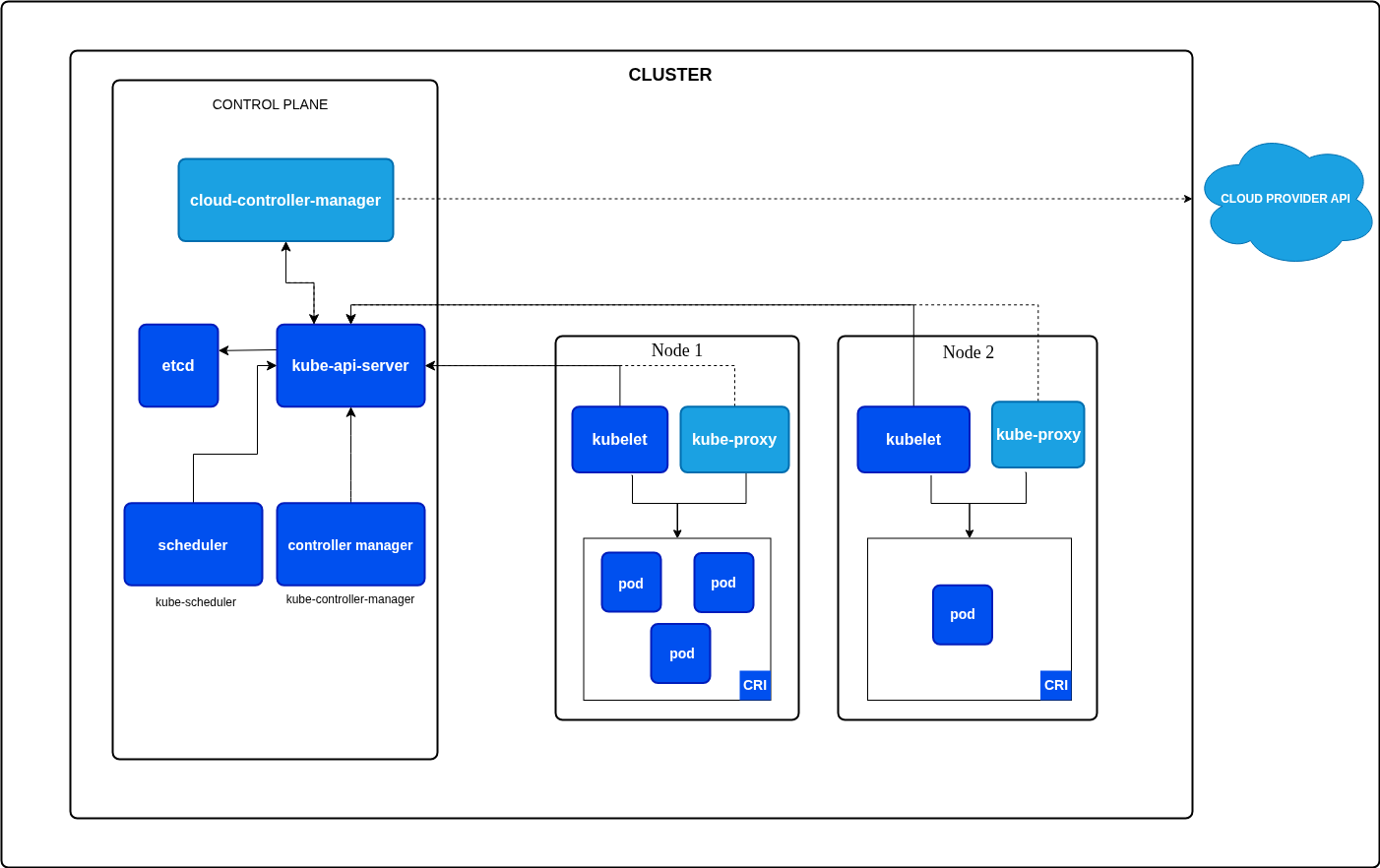
Cluster:
- A Kubernetes cluster consists of a control plane plus a set of worker machines, called nodes, that run containerized applications.
- Every cluster needs at least one worker node in order to run Pods.
Control Plane
- It is the brain of kubernetes cluster.
- It acts as the central management layer that orchestrates global decisions. It manages cluster state, schedules workloads and enforces policies It consists of 5 components:
- kube-api-server :
- The kube-api-server is the central management hub of a kubernetes cluster.
- It acts as the primary front-end of the control plane.
- Exposes kubernetes API so that users, external tools, and internal component can communicate.
- The main implementation of a kubernetes API server is kube-apiserver.
- kube-apiserver is designed to scale horizontally.
- etcd :
- ectd is a strongly consistent, distributed key-value store that provides a reliable way to store data that needs to be accessed by a distributed system or cluster of machines.
- It is kubernetes' backing store for all cluster data.
- It serves as the single source of truth for the entire cluster,storing all data, configuration settings, secrets, and metadata required for kubernetes to function.
- Everything that happens in the cluster (e.g. pod deployments, scaling events, node IPs, and config updates) is recorded in etcd.
- The kubernetes API server (kube-api-server) is the only component in the control plane that directly interacts with etcd. The other control plane components and users interact through the API server.
- Raft consensus algorithm: etcd uses the raft protocol to elect leader and replicate the data safely across all nodes, ensuring that if an individual machine fails, the cluster data state remains accessible and data is not lost.
- Reactive watches: K8s components uses etcd's watch feature to be notified instantly whenever a change happens in the key-value store, prompting the system react (e.g. spinning up a new Pods to meet a deployment requirement).
- Why etcd is critical? :
- Fault tolerance: Because it is distributed, etcd gracefully handles machine failures. It typically runs in an odd numbered cluster to maintain quorum.
- Catastrophic failure risk: Since all the cluster data is stored here, if the etcd data-store is completely lost and un-backed up, the cluster essentially loses its memory entirely. Because of this regular etcd backups are mandatory in production.
- kube-scheduler
- This component is responsible for assigning pods to nodes within a cluster.
- It ensures that workloads are distributed efficiently while meeting resource requirements, policy constraints and organization goals.
- How the K8s scheduler works?
- The scheduler works in two key phases, filtering and scoring.
- Filtering: The scheduler identifies the nodes that can run the pods based on resource requests (CPU, memory, ephemeral storage) and constraints like node affinity, taints and tolerations.
- Scoring: Each eligible node is scored based on various parameters like resource availability, topology preferences and workload distribution. The node with highest score is selected to run the pod.
- Once the node is selected the scheduler binds the pod to it, enabling the kubelet on the node to start running the pod.
- Key features of scheduler:
- Resource awareness: Ensures that pods are scheduled only on those nodes which have sufficient resources to meet their requests and limits.
- Custom policies: Supports advanced rules like node affinity , anti affinity, and custom scheduling policies.
- Extensibility: Allows users to implement custom schedulers for specific workload environments.
- Preemption: Enables higher priority pods to displace lower priority ones when resources are scarce. Further reading https://zesty.co/finops-glossary/kubernetes-scheduler/.
- kube-controller-manager
- The k8s controller manager is a daemon that runs multiple controllers within a single binary.
- Each controller manages a specific type of resource in k8s cluster, such as, nodes, pods, endpoints, and replication controllers.
- These controllers continuously monitor the cluster's current state and take corrective actions to reconcile it with the desired state defined by the user.
- For example if a pod crashes or is deleted , the controller manager will ensure that a replacement pod is created to maintain specified replica count.
- Key Controllers in K8s controller manager:
- Node controller : Monitors the health and availability of nodes in cluster. Handles node related events.
- Replication controller: Ensures the desired number of pod replicas are running at all times. Auto scales replicas up and down based on the replica count.
- Endpoint controller: Populates the Endpoints resource with info about which pods are backing a specific service.
- Service account and token controller: Manages default service accounts and their associated API tokens.
- Persistent volume controller: Oversees the binding of Persistent Volumes (PVs) to persistent volume chains (PVCs).
- Job controller: Manages the completion of batch jobs, ensuring all the tasks within the job are executed.
- How the controller manager works?
- Reconciliation loop: Each controller operates on a recon loop, compares current and desired state of the cluster and takes action to reconcile difference if discrepancies are found.
- Leader Election: In high availability setups, multiple controller manager instances may run, but only one acts as leader which is chosen using leader election mechanisms. This instance takes control.
- Pluggable architecture: Kubernetes allows custom controllers to be added to the controller managers or run separately as custom controllers tailored to specific needs.
- Why controller manager matters?
- Reliability: Ensures that cluster remains in the desired state, even during failures.
- Scalability: Automatically handles the scaling of resources, ensuring workloads can adapt to changing demands.
- Automation: Does automatic pod scaling , volume binding and service endpoint updates reducing manual intervention.
- Flexibility: Supports the integration of custom controllers, allowing orgs to extend k8s functionality for specific use cases.
- cloud-controller-manager
- The cloud controller manager (CCM) is a control plane component that links your kubernetes cluster to a cloud provider's API.
- In simple words, the cloud container manager is an deployment in k8s control plane which enables k8s to talk to individual cloud providers regarding the state of infrastructure.
- It basically separates the logic required to interact with the cloud platform from the core components that only interact with your cluster.
- The CCM only runs controllers that are specific to your cloud provider. If we are running k8s on our own premises, the cluster does not have a CCM.
- Controllers provided by CCM:
- Node controller: This controller is responsible for checking if a particular node is present in the cloud or not and updating the node labels with appropriate labels and annotations.
- Service Controller: When we deploy a service of type load balancer in the k8s cluster, then this controller comes in the picture. This controller is responsible for creating,updating,
- deleting load balancer in the cloud env.
- Route Controller: Responsible for configuring routes in the cloud environment so that the nodes remain reachable.
- For further reading: https://medium.com/@murtazavasi.dev/demystifying-cloud-controller-manager-0ba2d509603c
Node:
- A node is a physical or virtual machine that serves as a worker in the cluster.
- Nodes are responsible for running the workloads, which are encapsulated in pods.
- A k8s cluster contains multiple nodes that work together to ensure that your applications are available, scalable and distributed efficiently.
- Types of nodes:
- Master Nodes (Control plane nodes):
- Master node is the brain of the k8s cluster. It manages and controls the entire cluster, orchestrating the deployment and life cycle of applications across worker nodes.
- The master node's job is to make decisions about scheduling, monitoring the state of the cluster and handling all the management tasks.
- The master node is the one which hosts various components of the control plane including kube-api-server, control-manager, scheduler, etcd, cloud-controller-manager.
- Key responsibilities:
- Scheduling pods on worker nodes.
- Monitoring the health and status of the cluster.
- Managing configurations and cluster wide policies.
- Scaling applications on demand.
- Monitoring communication between components through the API server. Note: Most of these functions are the functions of control plane only.
- Worker Nodes:
- Worker nodes are where the actual applications run.
- Each worker node hosts the pods and ensures they have the necessary computing resources to operate effectively.
- Components of worker nodes:
- Kubelet: An agent running on each node that communicates with the master node. It ensures that the pods are running as expected and can restart them if necessary.
- Kube-proxy: Handles networking, managing network rules, and enabling communication between pods, both within the node and across different nodes in the cluster.
- Container-runtime: The software responsible for running the containers. (e.g. containerd, CRI-O, Docker(deprecated)). It pulls container images, starts and stops containers, and interacts with other kubernetes components.
- Key Responsibilities:
- Running and managing the pods assigned to them by master node.
- Maintaining network connections for communication between pods.
- Ensuring the required resources (CPU, memory, storage) are available for the running pods.
- Master Nodes (Control plane nodes):
Pods
- Pods are the smallest, most basic deploy-able units.
- A pod represents a single instance of a running process in cluster.
- Each pod can contain one(most common) or more tightly coupled containers. (OCI compliant containers managed by containerd) along with shared storage, networking and specifications for how to run the containers.
- All containers in a pod share the same storage volumes and network IP.
- Since all containers in a POD share the same network namespace, they can communicate with each other using localhost and they share the same IP address. From out side the pod, the containers are accessible via the pod's IP.
- Pods are meant to be ephemeral. They can be created, destroyed, and created easily by kubernetes as needed. When a pod is deleted, it does not get restarted. Instead, a new pod is created by k8s to replace it if needed.